Task management · all-in-one

Visual task management,
made simple.

Organize your work with powerful Kanban boards that make project tracking effortless and collaboration seamless — drag, drop, done.

Drag-and-drop boardPriority & assigneesFree up to 20 tasks
Task Management
What's inside

A familiar board,
with a memory.

Everything you expect from a Kanban board — columns, drag-and-drop, assignees and priorities — plus the context that usually gets lost between standups.

01
Kanban boards

Drag a card, move the work.

Visualize your workflow with drag-and-drop boards. Move tasks between To Do, In Progress and Done with a simple drag. Customizable columns and real-time collaboration keep everyone aligned.

Kanban boards
Priority & assignment
02
Priority & assignment

Owners and priorities, at a glance.

Assign tasks to team members, set priority from lowest to highest, and track ownership. Assignee avatars appear on cards, and you can filter by priority to focus on what matters most.

03
Rich detail

Every task carries its context.

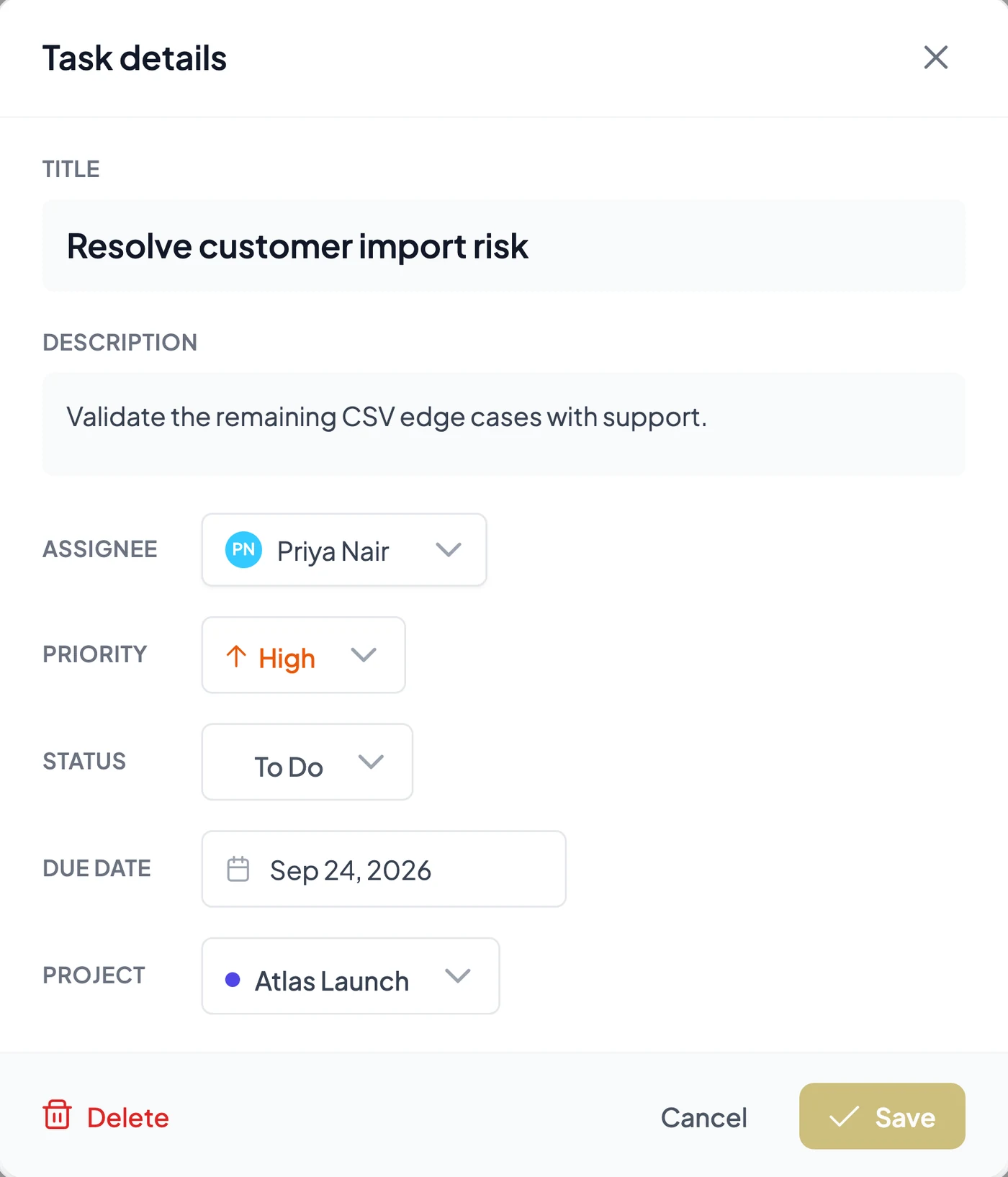
Title, description, assignee, priority and due date — all in one place. Track status across board columns and keep clear context for every piece of project work without switching tools.

Rich detail
Team collaboration view
04
Collaboration

Everyone in sync.

Real-time updates keep the whole team synchronized. See who's working on what, track progress, and manage the board together — perfect for remote, hybrid and in-office teams alike.

Perfect for small teams

Start free with up to 5 team members. No credit card required.

Task Management FAQ

Good to know.

How does the Kanban board work?+

Organize tasks into columns like To Do, In Progress and Done. Drag and drop between columns to update status. The board updates in real time so the whole team stays synchronized.

Can I assign tasks to team members?+

Yes. Every task can be assigned with a single click. Assignee avatars appear on cards so you can see who's responsible at a glance, and you can filter the board by assignee.

What priority levels are available?+

Five: Lowest, Low, Medium, High and Highest. Priority badges appear on cards, and you can filter or sort by priority to focus on what matters most.

Is there a limit on tasks?+

The free Starter plan supports up to 20 tasks — delete completed ones to make room. Growth, Scale and Enterprise include unlimited tasks.

What happens to tasks if I downgrade?+

If you downgrade to free with more than 20 tasks, you can still view and delete existing tasks but can't create or edit until you're below the limit.

Can tasks have due dates?+

Yes. Every task can have an optional due date, shown on the card and in the detail view to help your team track deadlines and plan work.

What can a task include?+

Title, description, assignee, priority, due date and status (from its column). View and edit everything in the task detail modal.

Can I link tasks to projects?+

Yes. Associate tasks with projects to organise work and see which tasks belong where — it integrates with project time tracking for a complete view.

Does it work on mobile?+

Yes. The board and task management are fully responsive and work on mobile through the web app — view, create and update from any device.

How do I get started?+

Open the Task Board from the main menu, create your first task with a title, and drag it across columns as work progresses.

Free for small teams · No credit card

Give your team one clear board.

Create your first task in seconds and drag it across the board as the work moves. Free for up to 20 tasks, no credit card.

Drag-and-drop boardPriority & assigneesFree up to 20 tasks